Querins: A Handwritten Font for Real Design
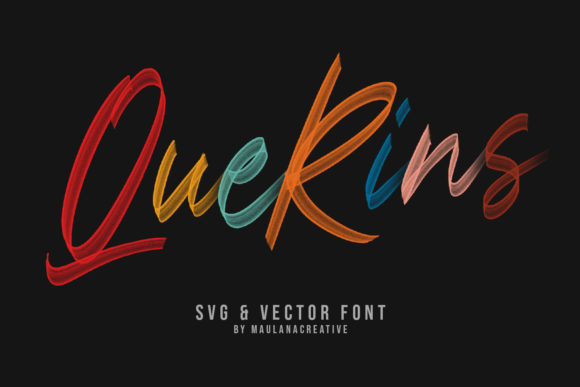
When I started redesigning my lifestyle blog header, I knew I needed a font that felt personal and inviting. Something that could bridge the gap between digital and handwritten charm. That’s when I discovered Querins—a stunning script font that blends the elegance of a brush pen with the precision of a pencil. It wasn’t just a font choice; it was a design decision that transformed how I approached my content layout.
Querins has a soft, organic rhythm that feels like it was written by hand. The curves are gentle, the strokes vary in weight naturally, and there’s an authenticity to its flow that makes it stand out. It’s not overly ornate or fussy, which means it can work well in both modern and traditional editorial settings. Whether I was designing a newsletter graphic or a printable guide, Querins added a touch of warmth without overwhelming the reader.
Querins in Editorial Projects
I first used Querins for a recipe ebook cover. The font’s fluidity matched the casual, homey vibe of the content. It gave the title a sense of movement, as if it were being written in real time. For the chapter openers, I paired it with a clean serif font for body text, creating a visual balance that made the pages feel cohesive and easy to read.
In another project, I designed a wedding guide for a client. Querins worked perfectly for the headings and pull quotes, adding a personal, heartfelt touch. It didn’t feel too formal, which was ideal for a guide that aimed to be both informative and approachable. The font’s subtle variations made each use feel unique, while still maintaining a consistent brand identity.
For a coaching workbook, I used Querins in section headings and decorative accents. Its handwritten quality helped create a sense of intimacy, making the content feel more like a conversation than a lecture. It also worked well for printable planner templates, where a touch of personality could make all the difference.
Designing with Querins
One of the things I appreciate most about Querins is how it supports visual hierarchy. Its natural variation makes it ideal for titles, subtitles, and pull quotes, where a bit of flair can draw the reader’s eye. However, it’s not meant for long blocks of text. When used in body copy, it can become difficult to read, especially on screens or in print.
That’s why I always pair it with a complementary font. For example, using a modern sans serif for captions and navigation, or a classic serif for longer paragraphs. This pairing creates contrast and keeps the design from feeling too busy. It also ensures that the message remains clear and accessible, no matter the format.
Querins also works well in social media graphics and web design. Its expressive nature can add character to logos, banners, or promotional materials. But again, it’s important to use it intentionally. Too much of it can feel chaotic, while just the right amount can elevate the entire design.
Practical Considerations
Before using Querins in any project, I always check the font’s features. It includes multiple styles, alternates, and ligatures that allow for more flexibility in design. These details can make a big difference when working on a layout that requires consistency across different formats—whether it’s a PDF, a printed booklet, or a mobile-friendly website.
It’s also important to consider licensing. Querins is a commercial font, which means it can be used in paid newsletters, client projects, and digital downloads. But I always review the terms to make sure I’m using it correctly, especially when working with templates or printables.
For long-form content, I tend to limit Querins to headings and short phrases. In a digital magazine layout, for instance, I might use it for the cover title and section headers, but rely on a more readable font for the body. This approach maintains the font’s charm while ensuring that the overall reading experience remains smooth and engaging.
When designing for print, I pay close attention to how Querins looks on paper. Its subtle texture adds depth, but it can also appear slightly less crisp depending on the printer. That’s why I often test it in different formats before finalizing a project.
A Font That Feels Like a Story
What makes Querins special is the way it feels like a story being told. It’s not just a typeface—it’s a tool for creating mood and emotion. Whether I’m working on a lifestyle blog, a recipe ebook, or a printable planner, Querins helps me connect with my audience in a more personal way.
It’s a font that encourages creativity without sacrificing clarity. It invites readers to slow down, to notice the details, and to feel something. And in a world where so much content is rushed and impersonal, that’s a rare and valuable quality.
As I continue to explore new editorial projects, I know Querins will remain a trusted companion. It’s a font that doesn’t just look good—it feels right. And in the end, that’s what makes all the difference.